 Transfer camera roll from iPod to PC easily.

How to transfer camera rolls from iPod to PC?
Because your iPod touch — and its built-in HD video camera — go with you everywhere, you’re always ready to record when the moment strikes. And now you can do it in stunning high definition. With iPod touch, you’re the only film crew you need. And now we will introduce a best program-- iMacsoft iPod to PC Transfer that can allow you to transfer the camera rolls to your PC hard drive. You can sync these camera rolls to iPhone or iPad. See more details as follows: 5.50 MB
 $24.oo
 Download and launch iMacsoft iPod to PC Transfer. Connect your iPod to PC, and all information about your iPod touch, such as Type, Capacity, Version, Serial Number and Format, will be shown on the main interface.
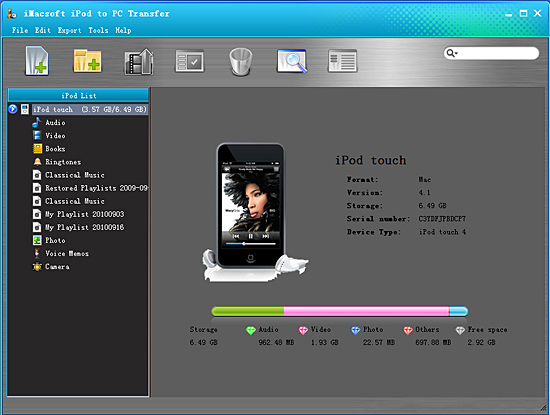
2.Select camera rolls and transfer to PC
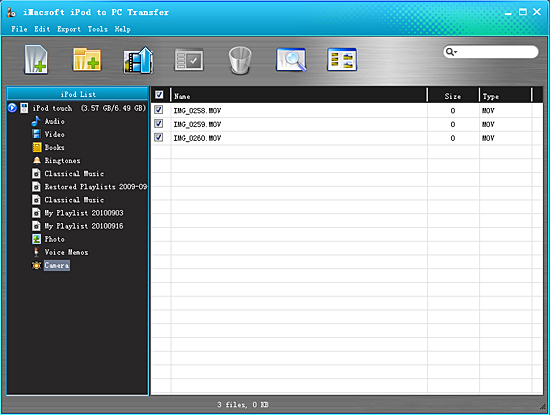
1)Open "Camera" option in iPod list. All these camera rolls you record are shown in "Camera" main interface.
2)Find one or more rolls you intend to transfer to and check them with no files loss.
3)Click the "Export checked files to local" button, select the folder that you want to transfer camera rolls to in the pop-up window. Then click "Save" button to transfer iPod camera rolls to PC.
1)Open "Camera" option in iPod list. All these camera rolls you record are shown in "Camera" main interface.
2)Find one or more rolls you intend to transfer to and check them with no files loss.
3)Click the "Export checked files to local" button, select the folder that you want to transfer camera rolls to in the pop-up window. Then click "Save" button to transfer iPod camera rolls to PC.
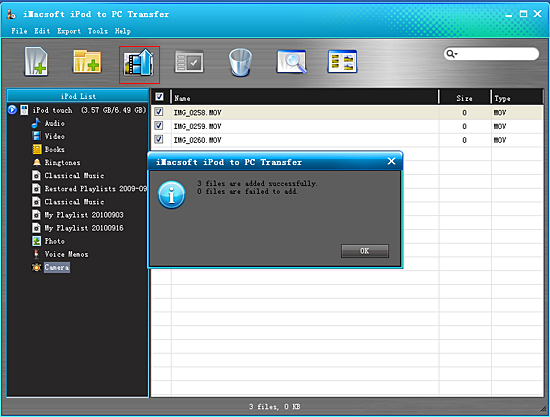
Well done, when you've transferred camera rolls from iPod to PC, you can sync them to iPhone or iPad by iTunes. Or review these recordings on your PC with your folks or friends.
|
Hot Tags: |
||||
Ready to try or buy?
5.50 MB
$24.oo 


-
- iPod to Mac Transfer

- iPhone to Mac Transfer
- iPad to Mac Transfer
- iPhone Ringtone Maker for Mac

- iPhone SMS to Mac Transfer
- iPhone Contact to Mac Transfer
- iPhone Call List to Mac Transfer
- iPhone iBooks to Mac Transfer
- iPhone Photo to Mac Transfer
- DVD to iPod Converter for Mac
- DVD to iPhone Converter for Mac
- DVD to iPad Converter for Mac
- iPod Video Converter for Mac
- iPhone Video Converter for Mac
- iPad Video Converter for Mac
- iPod to Mac Transfer
-
- Mac DVD Toolkit
- iPod Mate for Mac
- iPhone Mate for Mac
- iPad Mate for Mac
- DVD Ripper Suite for Mac
- DVD Maker Suite for Mac
- DVD to iPod Suite for Mac
- DVD to iPhone Suite for Mac
- DVD to iPad Suite for Mac
- DVD to MP4 Suite for Mac
- DVD to Apple TV Suite for Mac
- DVD Audio Ripper Suite for Mac
- DVD to FLV Suite for Mac
- DVD to PSP Suite for Mac
- Mac DVD Toolkit
