 Best DVD Copy software to copy DVD, clone DVD, backup DVD

iMacsoft DVD Copy
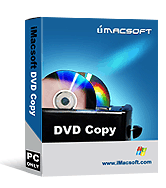
Price: $32
 Get Mac Version
iMacsoft DVD Copy is fast and easy-to-use DVD Copy and DVD Clone software,
which can copy DVD movie to DVD in 1:1 ratio perfectly,
and compress DVD-9 to DVD-5 disc with excellent DVD copy
quality.
iMacsoft DVD Copy can easily get your DVD copies which remain 100% same to
the original DVD movie Discs. The DVD Copy software can not only copy
DVD movie to DVD folder or ISO file and backup DVD to
your hard disk, but also burn ISO file or DVD folder back to DVD
Disc.
iMacsoft DVD Copy can copy DVD movies with any region code, it allows you to
include or omit DVD menu, select subtitle and audio track, choose full disc
or main movie separately to create customized DVD. Personalize and backup
your precious DVD movies without fear of damage or loss.
The DVD Copy software allows you to play your DVD movie on home and computer DVD
players every day without worry about getting your originals
scratched or damaged. You get disc protection with no loss of playback quality.





-
- iPod to Mac Transfer

- iPhone to Mac Transfer
- iPad to Mac Transfer
- iPhone Ringtone Maker for Mac

- iPhone SMS to Mac Transfer
- iPhone Contact to Mac Transfer
- iPhone Call List to Mac Transfer
- iPhone iBooks to Mac Transfer
- iPhone Photo to Mac Transfer
- DVD to iPod Converter for Mac
- DVD to iPhone Converter for Mac
- DVD to iPad Converter for Mac
- iPod Video Converter for Mac
- iPhone Video Converter for Mac
- iPad Video Converter for Mac
- iPod to Mac Transfer
-
- Mac DVD Toolkit
- iPod Mate for Mac
- iPhone Mate for Mac
- iPad Mate for Mac
- DVD Ripper Suite for Mac
- DVD Maker Suite for Mac
- DVD to iPod Suite for Mac
- DVD to iPhone Suite for Mac
- DVD to iPad Suite for Mac
- DVD to MP4 Suite for Mac
- DVD to Apple TV Suite for Mac
- DVD Audio Ripper Suite for Mac
- DVD to FLV Suite for Mac
- DVD to PSP Suite for Mac
- Mac DVD Toolkit

Free Software
iMacsoft DVD Maker Suite34% Off, Save $22.00
Including iMacsoft DVD Creator and iMacsoft DVD Copy. Fast copy and create DVD movies, copy DVD to DVD and burn to DVD with ease... Learn more
iMacsoft Media Toolkit Ultimate48% Off, Save $72.00
Including DVD Ripper, Video Converter, DVD Copy, DVD Creator, and iPod to PC Transfer. It combines functions of DVD ripping, copying, creating, video conversion and iPod to PC transfer. Learn more

- Copy DVD to DVD perfectly in 1:1 ratio
The DVD Copy software can copy DVD-9 to DVD-9, DVD-5 to DVD-5 in 1:1 ratio with all the menus, extras, subtitles, audio tracks; or compress and copy DVD-9 to DVD-5 completely with excellent DVD copy quality; - Copy DVD to computer for backup
Copy DVD movie to ISO file or DVD folder and backup DVD on your hard drive and burn DVD copy later; - Burn DVD folder or ISO to DVD
The DVD Copy software can burn ISO file or DVD folder to DVD for watching on your DVD player; - Copy main movie only
Full disc copy mode allows you to copy the whole movie entirely, while main movie copy mode will copy main movie only with extras and special features omitted;

- High compatibility
The DVD Copy has higher compatibility than other DVD copying software which can copy DVD to any disc including dual-layer DVD with any DVD+RW/-RW burner to play on all DVD players; - Erase rewritable disc
If your inserted RW disc is not blank, the DVD copy software will prompt and help you erase it for rewriting the disc. - Simple to use
Using this DVD copier to copy DVD movie is so easy: just load your DVD, click "Start Copy", and insert a writable disc, then get your copied DVD disc with great quality; - Multi-language and Multi-skin
Support multiple languages including simplified Chinese and English and the changeable skins;

- How to copy movie DVD to a blank DVD disc?
- How to back up DVD disc to ISO or DVD Folder on your computer?
- How to copy ISO files and DVD folder to new DVD for backup?
- How to customize your own DVD when DVD copying?
 Supported Source
- DVD-Video disc
- DVD-Video image(.iso)
- DVD folder
 Supported Target
| DVD-R(W) | DVD+R(W) | DVD-R DL | DVD+R DL |
| DVD-RAM | DVD-Video image(.iso) | DVD folder |
 System Requirements
| Operating system | Win8, Win7, Vista, WinXP |
| Processor | 750MHz Intel, AMD CPU or above |
| Available HD space | 100 MB or more |
| ROM drive | at least one DVD-ROM drive |
| Display | Super VGA (800 x 600) resolution or higher |
 Main Screenshot
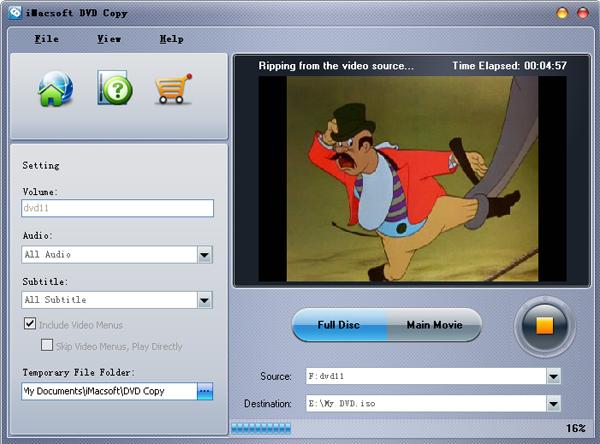
Ready to try or buy?
- Buy iMacsoft DVD Copy Price: $32
- Download iMacsoft DVD Copy
