 Fast and easily transfer audio books from iPad to Mac.

How to export audio books from iPad to Mac?
"Reading is a joy on iPad. Text looks crisp and bright. Pages turn with a flick. And you can buy new books from the iBookstore. Lots of audio books your iPad has, perhaps sometimes my friends who brought new iPad or iPhone 4 wanna get my audio books to them. And iTunes library hasn't and I bought them on Apple Store. Is there any useful program to help me?"For hard question, I deem that our product-iMacsoft iPad to Mac Transfer will help you much. It can allow you to easily transfer audio books from iPad to Mac for backup. Or you can directly add audio books to iTunes library and sync them to iPhone, iPad and iPod touch. See the step by step tutorials as below:
 5.98 MB
 $25.oo
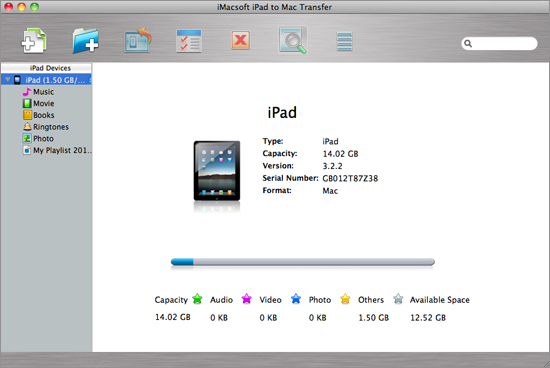
 Free download iMacsoft iPad to Mac Transfer and connect your iPad to Mac. You will see the iPad information such as Type, Capacity, Version, Serial Number, and Format, will be shown on the main interface.
2. Export audio book from iPad to Mac
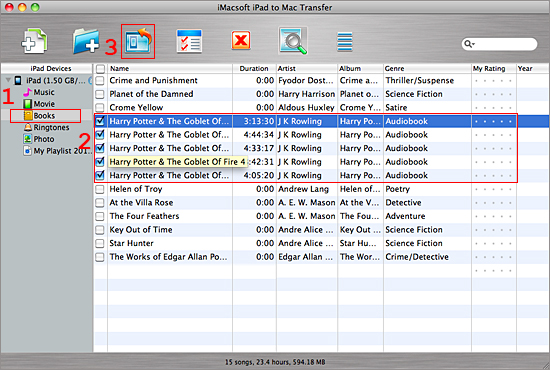
1) Click the "Books" icon under iPad library list. All books files are displayed on the library panel.
2) Locate audio books files you want to export in the "Books" library and check them.
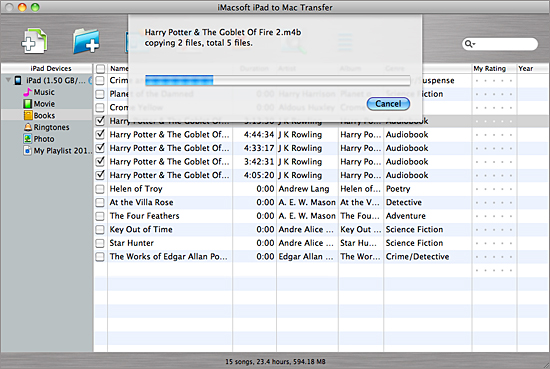
3) Choose the "Export->Export to local" option on the "File" top-menu, or directly click the "Export checked files to local" button to export audio books to Mac and select a target folder for saving iPad audio books in the dialog box that pops up, and press "Save" button and start to transfer audio books from iPad to Mac.
1) Click the "Books" icon under iPad library list. All books files are displayed on the library panel.
2) Locate audio books files you want to export in the "Books" library and check them.
3) Choose the "Export->Export to local" option on the "File" top-menu, or directly click the "Export checked files to local" button to export audio books to Mac and select a target folder for saving iPad audio books in the dialog box that pops up, and press "Save" button and start to transfer audio books from iPad to Mac.
|
Hot Tags: |
||||
Ready to try or buy?
5.98 MB
$25.oo 


-
- iPod to Mac Transfer

- iPhone to Mac Transfer
- iPad to Mac Transfer
- iPhone Ringtone Maker for Mac

- iPhone SMS to Mac Transfer
- iPhone Contact to Mac Transfer
- iPhone Call List to Mac Transfer
- iPhone iBooks to Mac Transfer
- iPhone Photo to Mac Transfer
- DVD to iPod Converter for Mac
- DVD to iPhone Converter for Mac
- DVD to iPad Converter for Mac
- iPod Video Converter for Mac
- iPhone Video Converter for Mac
- iPad Video Converter for Mac
- iPod to Mac Transfer
-
- Mac DVD Toolkit
- iPod Mate for Mac
- iPhone Mate for Mac
- iPad Mate for Mac
- DVD Ripper Suite for Mac
- DVD Maker Suite for Mac
- DVD to iPod Suite for Mac
- DVD to iPhone Suite for Mac
- DVD to iPad Suite for Mac
- DVD to MP4 Suite for Mac
- DVD to Apple TV Suite for Mac
- DVD Audio Ripper Suite for Mac
- DVD to FLV Suite for Mac
- DVD to PSP Suite for Mac
- Mac DVD Toolkit
